Saturday, February 18, 2017

yogi_Starting With Cell (row 6 and column of cell marked etctrfh) Compute Row By Row Sum Of Every Nth Column

Google Spreadsheet   Post  #2119
Yogi Anand, D.Eng, P.E.      ANAND Enterprises LLC -- Rochester Hills MI     www.energyefficientbuild.com.   Feb-18-2017
question by Daxter2500:
https://productforums.google.com/forum/?utm_medium=email&utm_source=best_answer_notification_button#!topic/docs/g3siKRNfJq8;context-place=forum/docs
How to create a locked formula that counts every three columns, even if adding new columns
Hello,

First time poster, long time lurker & learner. But I can't figure out...

1) How to add an array of cells (specifically one cell from every three columns: H3, K3, N3, Q3.... FC3 to infinite ideally).

2) How to lock the formula (or part of the formula) even when I add new three new columns every day (Indirect has only taken me so far, but I've learned from you that it can not be combined with an Array Formula).

Success: I've been able to get a locked 7-day total from every three columns. When I add 3 new columns everyday, I don't have to adjust the formula at all:

=SUM(INDIRECT("K3"),INDIRECT("N3"),INDIRECT("Q3"),INDIRECT("T3"),INDIRECT("W3"),INDIRECT("Z3"),INDIRECT("AC3"))

Problem: But I want to add up all of my column TOTALS (from today to the start of my project) by adding up H3 (locked) to every three cells (so far it goes to column FC3, but will grow by three every day).
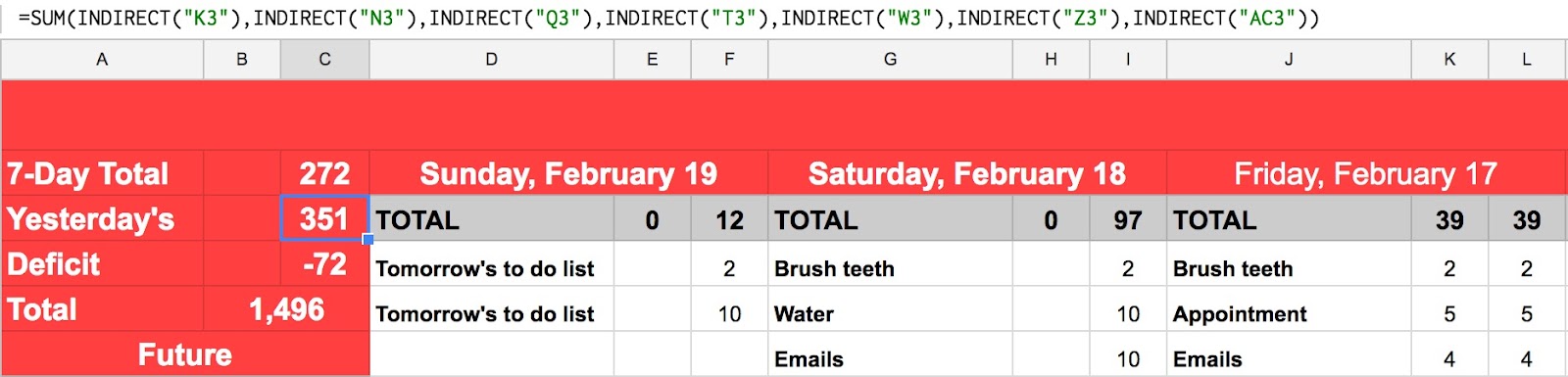
Any solutions?

yogi_Starting With Cell H5 Compute Row By Row Sum Of Every Nth Column In The Corresponding Row

Google Spreadsheet   Post  #2118
Yogi Anand, D.Eng, P.E.      ANAND Enterprises LLC -- Rochester Hills MI     www.energyefficientbuild.com.   Feb-18-2017
question by Daxter2500:
https://productforums.google.com/forum/?utm_medium=email&utm_source=best_answer_notification_button#!topic/docs/g3siKRNfJq8;context-place=forum/docs
How to create a locked formula that counts every three columns, even if adding new columns
Hello,

First time poster, long time lurker & learner. But I can't figure out...

1) How to add an array of cells (specifically one cell from every three columns: H3, K3, N3, Q3.... FC3 to infinite ideally).

2) How to lock the formula (or part of the formula) even when I add new three new columns every day (Indirect has only taken me so far, but I've learned from you that it can not be combined with an Array Formula).

Success: I've been able to get a locked 7-day total from every three columns. When I add 3 new columns everyday, I don't have to adjust the formula at all:

=SUM(INDIRECT("K3"),INDIRECT("N3"),INDIRECT("Q3"),INDIRECT("T3"),INDIRECT("W3"),INDIRECT("Z3"),INDIRECT("AC3"))

Problem: But I want to add up all of my column TOTALS (from today to the start of my project) by adding up H3 (locked) to every three cells (so far it goes to column FC3, but will grow by three every day).

Any solutions?

yogi_In Rows C2:I And Down Pull Row By Row Values From Last Seven Columns Of The Corresponding Rows

Google Spreadsheet   Post  #2117
Yogi Anand, D.Eng, P.E.      ANAND Enterprises LLC -- Rochester Hills MI     www.energyefficientbuild.com.   Feb-18-2017
question by GeoTechGuy:
https://productforums.google.com/forum/?utm_medium=email&utm_source=best_answer_notification_button#!topic/docs/e7-heDOyIr4;context-place=mydiscussions
Filter view dynamically
Hi, 

I have to following formula that works great at the moment but, as I add columns to the sheet I don't want to have to edit the formula each time. Is there a way (maybe via script) to filter view every 6th column? Below is the script that works but I need a way to have complete the same function without having to edit it all the time as columns are added. For example, when I add columns GS-GY, I need a script that will recognize GY as the 6th column and add it to the filter. 


=filter(({K2:K;R2:R;Y2:Y;AF2:AF;AM2:AM;AT2:AT;BA2:BA;BH2:BH;BO2:BO;BV2:BV;CC2:CC;CJ2:CJ;CQ2:CQ;CX2:CX;DE2:DE;DL2:DL;DS2:DS;DZ2:DZ;EG2:EG;EN2:EN;EU2:EU;FB2:FB;FI2:FI;FP2:FP;FW2:FW;GD2:GD;GK2:GK;GR2:GR}),NOT(ISBLANK(({K2:K;R2:R;Y2:Y;AF2:AF;AM2:AM;AT2:AT;BA2:BA;BH2:BH;BO2:BO;BV2:BV;CC2:CC;CJ2:CJ;CQ2:CQ;CX2:CX;DE2:DE;DL2:DL;DS2:DS;DZ2:DZ;EG2:EG;EN2:EN;EU2:EU;FB2:FB;FI2:FI;FP2:FP;FW2:FW;GD2:GD;GK2:GK;GR2:GR}))))


Thanks all.

Friday, February 17, 2017

yogi_From Table B:I Of FoosBall Scores Compute Row By Row Loser (with a numeric score of less than 10)

Google Spreadsheet   Post  #2116
Yogi Anand, D.Eng, P.E.      ANAND Enterprises LLC -- Rochester Hills MI     www.energyefficientbuild.com.   Feb-17-2017
question by Brian Bimschegler:
https://productforums.google.com/forum/?utm_medium=email&utm_source=best_answer_notification_button#!topic/docs/pKWhsgqtWbw;context-place=mydiscussions
Within ARRAYFORMULA, find 2nd largest value in a row that has 7 columns
I'm looking to create a Foosball sheet for my office. We enter scores via Typeform. When a match is entered in Typeform, a new row is created at the bottom of the sheet with the appropriate scores. I'm looking to use =ARRAYFORMULA so that functions are run on any newly-created rows.

Since there are only 2 players in foosball, I need to calculate the winner and loser. The winner is easy: person with 10 points. The loser is not as simple. In theory, the Loser is the person with 0-9 points. I determined a way to calcucate this for our 3-person office (in the sheet:

=arrayformula(if(isblank(A2:A),, if(isblank(B2:B),if(C2:C<D2:D,"David","Twok"),if(isblank(C2:C),if(B2:B<D2:D,"Bim","Twok"),if(isblank(D2:D),if(B2:B<C2:C,"Bim","David"))))))

However, we are adding 4 new players. As we scale players up, IF/ELSE logic becomes exponentially unwieldy. I am not certain how to figure out the most efficient (see: not a billion =ISBLANK() and =IF() statements) way to calculate the Loser.

I was thinking about something like:

=ARRAYFORMULA(IF(ISBLANK(A2:A),,LARGE([somehow get an array of numbers in a specific row],2)))

Then somehow getting that column number, and running an HLOOKUP to get the name of the person who earned the Loser score.

I can easily work these formulas outside of an arrayformula, though my constraint of adding new rows automatically and needing formulas to run on them makes things difficult.

The sheet is in view-access here.

yogi_Pull Every Nth Column From Source In Another Sheet Dynamically As Columns Are Added Or Deleted In Source

Google Spreadsheet   Post  #2115
Yogi Anand, D.Eng, P.E.      ANAND Enterprises LLC -- Rochester Hills MI     www.energyefficientbuild.com.   Feb-17-2017
question by GeoTechGuy:
https://productforums.google.com/forum/?utm_medium=email&utm_source=ba_notification#!topic/docs/e7-heDOyIr4;context-place=forum/docs
Filter view dynamically
Hi, 

I have to following formula that works great at the moment but, as I add columns to the sheet I don't want to have to edit the formula each time. Is there a way (maybe via script) to filter view every 6th column? Below is the script that works but I need a way to have complete the same function without having to edit it all the time as columns are added. For example, when I add columns GS-GY, I need a script that will recognize GY as the 6th column and add it to the filter. 


=filter(({K2:K;R2:R;Y2:Y;AF2:AF;AM2:AM;AT2:AT;BA2:BA;BH2:BH;BO2:BO;BV2:BV;CC2:CC;CJ2:CJ;CQ2:CQ;CX2:CX;DE2:DE;DL2:DL;DS2:DS;DZ2:DZ;EG2:EG;EN2:EN;EU2:EU;FB2:FB;FI2:FI;FP2:FP;FW2:FW;GD2:GD;GK2:GK;GR2:GR}),NOT(ISBLANK(({K2:K;R2:R;Y2:Y;AF2:AF;AM2:AM;AT2:AT;BA2:BA;BH2:BH;BO2:BO;BV2:BV;CC2:CC;CJ2:CJ;CQ2:CQ;CX2:CX;DE2:DE;DL2:DL;DS2:DS;DZ2:DZ;EG2:EG;EN2:EN;EU2:EU;FB2:FB;FI2:FI;FP2:FP;FW2:FW;GD2:GD;GK2:GK;GR2:GR}))))


Thanks all.